
Zoom in for a closer look, then drag or swipe to move around the image.
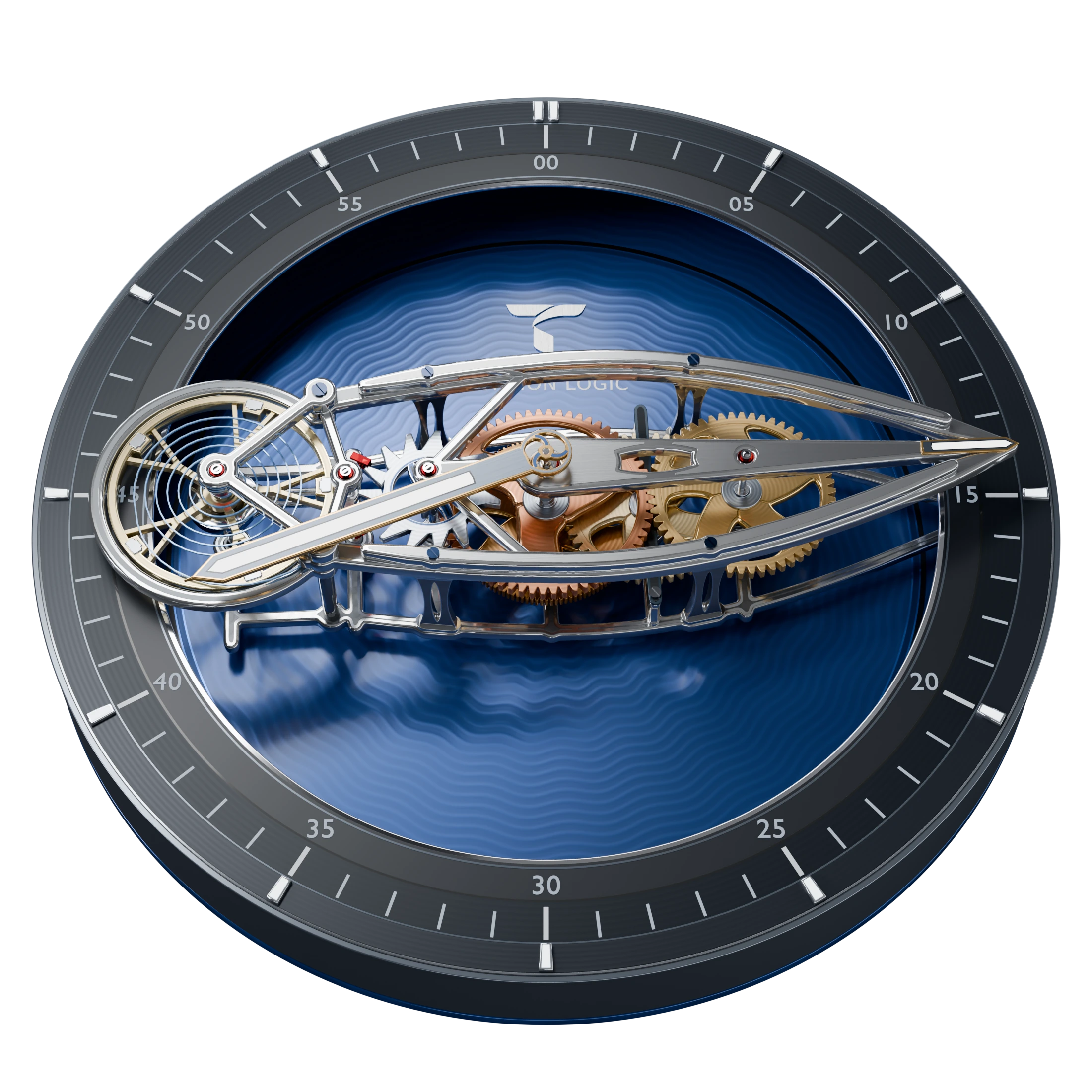
Our 3D model viewed at an angle, showing the silver frame, moving gears, and blue patterned dial.
Open full-size image (opens in a new tab)Flying Carousel
A minute hand with moving gears.
Flying Carousel puts the moving parts in the minute hand. Gears turn inside a long silver frame as it travels around the blue dial. Read the minutes at its pointed tip and the hour from the shorter hand.
Wear OS 6 or later
Google Play availability will be announced here.
Compatibility & installationReading the minutes
The silver frame makes one full turn every hour. Its pointed tip is the minute hand, so you read it just as you would on a traditional watch.
Reading the hour
The shorter hand moves separately from the frame and makes one turn every twelve hours.
Watching the parts move
Look inside the frame to see the gears turn and the balance wheel swing back and forth. We base their animation on the connections in our 3D model.
How the minute hand carries the gears.
The long silver frame is called a carriage. It travels around the dial once an hour, carrying a series of connected gears called a gear train. At one end, you can see the balance wheel swinging back and forth.
The shorter hour hand turns on a separate shaft through the center. Under the blue dial, two toothed rings and a smaller gear connect its twelve-hour turn to the carriage’s one-hour turn.
We calculate the animation from the size and connections of the modeled gears. That’s why the teeth meet as the parts turn. Your watch’s clock supplies the time.
Inside the movement
See the gear connections, tooth counts, and animation calculations.
Inside Flying Carousel
Following the gears
The mechanism beneath the dial uses two rings, each with 240 teeth on the inside. A small gear called a pinion has 24 teeth and rolls inside the fixed ring. A 22-tooth wheel on the same shaft, or arbor, engages the rotating ring. This two-part gear is called the compound planet, and it travels with the carriage.
The rotating ring connects to the central hour shaft and the 120-tooth great wheel, so they turn together. Above the dial, the great wheel meets the third-wheel pinion on the carriage. The gears pass motion toward the tip, back through a central relay wheel, and on to the escapement and balance at the other end. In a mechanical watch, the escapement releases the gears a little at a time as the balance swings.
- 120Great wheelTurns with the hour shaft
- 11 / 48Third wheelPinion / wheel
- 6 / 54Fourth wheelPinion / wheel
- 62Relay wheelTransfers the motion
- 6 / 15Escape wheelPinion / escape teeth
The great wheel and relay share the same center but sit at different heights. Shafts and sleeves fit inside one another so the hour hand, carriage, and relay can turn at different speeds.
Gear sizes and connections
These are the tooth counts we use in the model. The ratios between connected gears determine how fast each one turns.
| Member | Tooth counts | Role in the movement |
|---|---|---|
| Perimeter planet | 24-tooth pinion / 22-tooth wheel | Connects the fixed ring to the rotating barrel ring beneath the dial. |
| Great wheel | 120 teeth | Turns with the hour shaft and drives the train carried by the carousel. |
| Third wheel | 11-tooth pinion / 48-tooth wheel | Receives motion from the great wheel and passes it to the fourth wheel. |
| Fourth wheel | 6-tooth pinion / 54-tooth wheel | Carries the motion toward the tip of the carriage and into the relay. |
| Relay wheel | 62 teeth | Returns the motion through the central axis to the escape pinion. |
| Escape wheel | 6-tooth pinion / 15 escape teeth | Connects the gear train to the escapement and balance. |
The hour hand
Connecting the hour hand
The compound planet connects the two rings beneath the dial. Their gear ratio links the carriage’s one-hour turn to the slower hour hand.
The rotating ring connects to the central shaft, which passes through the carriage to the hour hand above it. The hand completes one turn every twelve hours.
How we calculate the animation
Turning the model into motion
Our software reads the parts, shafts, tooth counts, and gear connections from the model. It calculates their motion and writes the animation instructions for Wear OS.
Solve the rates
We start with the rotating ring at one turn every twelve hours, the carriage at one turn per hour, and the fixed ring at rest. The software follows each gear and shaft connection to calculate the speed of the remaining parts.
Align the teeth
We calculate each gear’s starting angle so its teeth meet the gaps in the next gear. Wheels and pinions on the same shaft keep their angles aligned.
Account for the moving frame
Each gear spins on its own shaft while traveling around the dial. We calculate how it turns within the carriage, then add the carriage’s rotation to get its motion on screen.
Write the Wear OS animation
The calculated speeds and starting angles become instructions in Wear OS Watch Face Format. One set of instructions moves the carriage; others turn its individual parts. We also check that the animation continues correctly when the clock rolls into a new minute or hour.
Check the result against the model
Our build checks compare the artwork positions and gear ratios with the model. They also check how the teeth meet, whether parts have enough space, and where each part travels as the carriage turns.
At the end of the train
The balance wheel’s rhythm
The 15-tooth escape wheel turns twelve times per minute within the carriage. With two beats per tooth, that gives six beats per second. Each full back-and-forth swing has two beats, so the balance makes three full swings per second: 3 Hz, or 21,600 vibrations per hour in watchmaking terms.
We adapt the balance animation for the screen’s frame rate. The model calculates how the parts move together; it doesn’t simulate spring energy or friction. Your watch’s electronic clock keeps the time.
Before you install
Will it work on my watch?
Check the requirements below, then confirm that Google Play lists your watch as compatible before you buy.
- Platform
- Wear OS 6 or later
- Format
- Watch Face Format 4
- Availability
- Preparing for launch
- Product type
- Digital watch face