
For iPhone owners

Keep your iPhone.
Find your next watch.

You can use our faces while keeping your iPhone. You’ll need a compatible Wear OS watch and an Android phone for setup and updates. This guide explains what to buy and how it works.

No need to move your number or replace your iPhone.

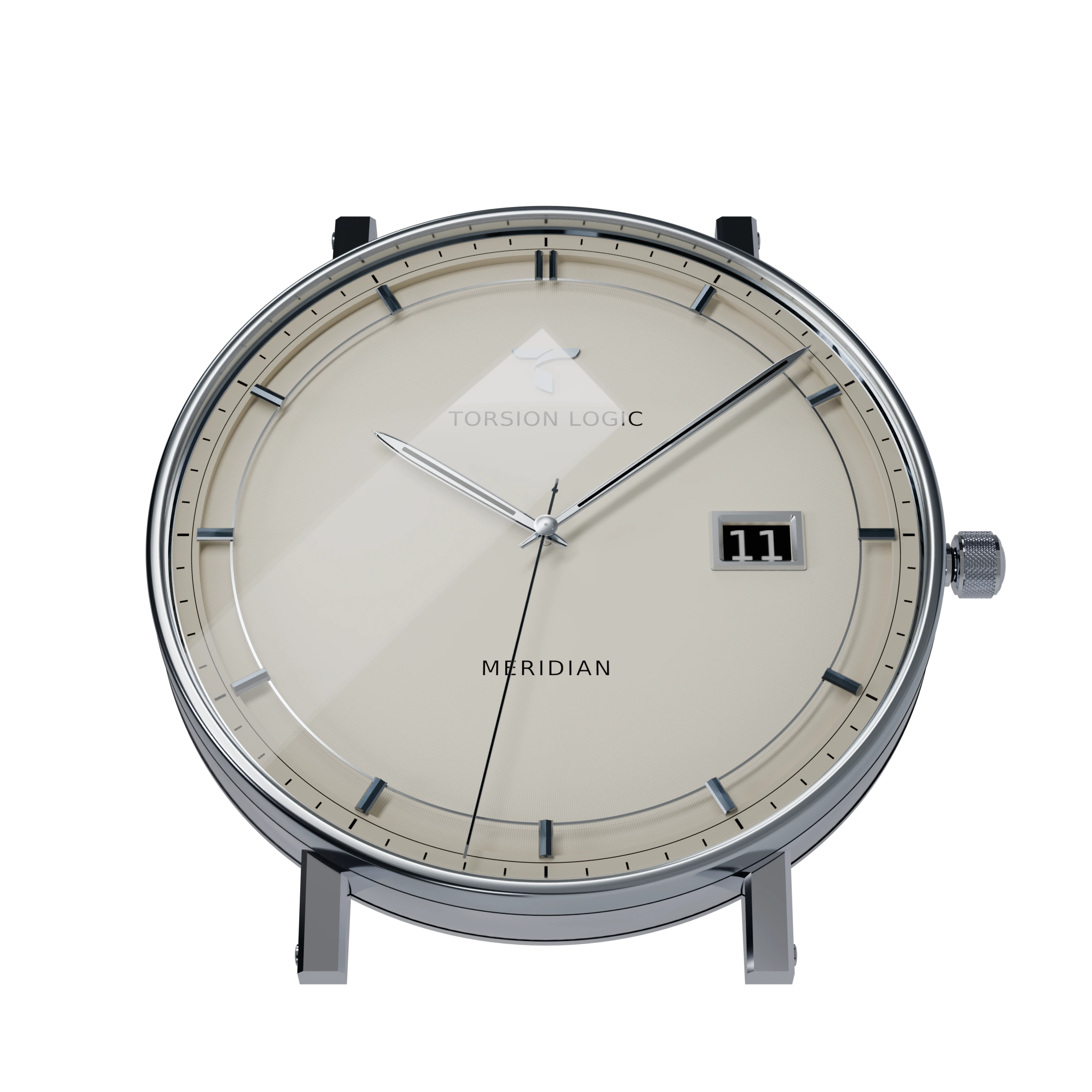
Meridian Date at 30 degrees in Ivory, in a steel case with lugs and crown, showing the hour markers standing clear of the dial and the recessed date window
Meridian Date · Watch face artwork. Hardware sold separately.
What you’ll need

An Android phone for setup and updates.

TorsionLogic faces run on Wear OS 6 or later, not Apple Watch. The Samsung and Google watches below need an Android phone for setup and ongoing management. Their official apps do not pair them with an iPhone.

Use the Android phone on Wi-Fi to set up the watch and install faces and updates. Once a face is installed, it can show the time away from the phone. iMessage, iPhone notifications, and Apple Health integration do not come with this setup.

Samsung compatibility · Google compatibility · Using Wear OS away from a phone

01 / Choose your starting point

Watch and phone options

You don’t need an expensive phone to use our faces. Here are five combinations to consider.

U.S. dollars · Reviewed September 13, 2026. Used prices are shopping targets, not verified offers. New totals use the reference or launch prices shown, rounded to the nearest dollar; current sales may be lower. Hardware only: tax, shipping, missing chargers, the watch face, and optional services are extra. No trade-in or carrier credits assumed.

01 / Used watch · existing phone

Use what you have

$100–180watch + phone

On your wrist
Galaxy Watch7$100–180 used target
For setup & updates
Your spare Android phone$0 additional

If you already have a compatible Android phone, you only need the watch. Check that the phone can install Galaxy Wearable and its watch plugin, and that the watch has Wear OS 6 or later installed.

02 / Both devices used or refurbished

A used watch and phone

$170–300watch + phone

On your wrist
Galaxy Watch7$100–180 used target
For setup & updates
Galaxy A16 5G$70–120 used target

A lower-cost option if you need both devices. You can keep the Android phone on Wi-Fi at home for setup and updates. Check the watch’s installed software and buy from a seller who accepts returns.

03 / New watch · budget phone

Buy new, keep it simple

About $580watch + phone

On your wrist
Galaxy Watch9 · 40 mm Bluetooth$379.99 reference price
For setup & updates
Galaxy A16 5G$199.99 launch price

A current Samsung watch with an inexpensive Samsung phone. Update the A16 before pairing; the Watch9 generation calls for Android 13 or later. A second cellular line is optional.

04 / Premium watch · flagship phone

A watch and phone from Google

About $1,499watch + phone

On your wrist
Pixel Watch 5 · 41 mm Wi-Fi$399.99 reference price
For setup & updates
Pixel 11 Pro$1,099 launch price

For someone who also wants a capable second daily phone. Pixel Watch 5 requires Android 12 or later. Choose this pairing for the phone’s own uses; the watch face does not need a flagship phone.

05 / Premium watch · flagship phone

A watch and phone from Samsung

About $2,000watch + phone

On your wrist
Galaxy Watch Ultra2$699.99 reference price
For setup & updates
Galaxy S26 Ultra · 256 GB$1,299.99 regular price

A larger watch with a premium Android phone. Ultra2 requires Android 13 or later. Its cellular capability does not require you to activate a watch plan just to use the face.

What to check before buying used
  • Confirm Wear OS 6 or later is installed on the watch. Galaxy Watch7 launched on an older version; check the update on the actual unit. Samsung’s Watch7 software and manuals.
  • If you need to buy an Android phone, look for Android 13 or later, at least 4 GB RAM, current security support, and working Google Play services. The OS minimum alone does not guarantee the current companion app will install.
  • Ask the seller to remove their accounts and reset both devices. Avoid devices that are activation locked, company managed, or tied to an unpaid contract.
  • Check watch battery condition, screen burn-in, charger inclusion, and the return policy. Confirm the phone can complete setup on Wi-Fi without paid carrier activation.
  • A low-priced fitness band, Galaxy Fit, older Tizen Galaxy Watch, or generic “Android-compatible” watch is not a substitute for Wear OS 6. An iPad, Mac, or Android tablet is not a supported replacement for the Android phone in these pairings.

02 / Know the everyday experience

What will work with this setup?

The face runs on the watch, but this setup won’t connect the watch to your iPhone’s messages or Apple services. Here’s what to expect day to day.

With a Wear OS watch paired to an Android phone, while you keep using your iPhone
What you wantWhat to expect
Our watch facesShow the time and animation on the watch after installation, even when the Android phone is at home.
Installations & updatesNeed internet access and your Google account. Keep your Android available for pairing, management, and troubleshooting.
iPhone calls, notifications & iMessageWill not appear on the watch through its official Android app. Keep using your iPhone for these.
Apple Health, Activity rings & Apple PayThis setup does not provide native Apple Watch integration. Watch health apps and payment services have their own accounts and requirements.
Online apps away from homeDepend on the app and a connection: a nearby Android, watch Wi-Fi, or an activated supported LTE plan. Offline features vary.
LTE linked to your iPhone numberDo not assume number sharing will work. Confirm the exact watch, Android phone, carrier, and plan before buying cellular service.

See Google’s offline-use guide and Pixel Watch network and carrier requirements. We discuss third-party connection apps in the questions below.

03 / Setting up

Your first setup, step by step.

  1. Choose a watch that can run the face.

    Our current collection requires Wear OS 6 or later. On a used watch, ask for a photo of Settings → System → About → Versions (labels vary), and check the exact model and regional update availability. An advertised future update is not enough. Google Play makes the final device-eligibility decision.

  2. Set up your Android phone.

    Use an Android phone you own and can keep. Connect it to Wi-Fi, install its system and Google Play updates, and sign in with your own Google account. A SIM or extra phone plan is not needed for this Wi-Fi setup. Choose a phone with Google Play services and Play Protect certification.

  3. Pair through the manufacturer’s app.

    Install Galaxy Wearable for Samsung watches, or the Google Pixel Watch app for Pixel watches, from Google Play on the Android phone. Enable Bluetooth, keep the devices together, and follow the app’s pairing instructions. Samsung setup also uses a Samsung account.

  4. Update the watch and check Google Play.

    Install the watch’s available system updates, restarting and checking again as needed. Use the same Google account on the watch and Android phone. Check that the face’s released Play listing offers installation on your watch before purchasing.

  5. Install and select your TorsionLogic face.

    Open the released face’s Google Play listing on the watch, or choose the watch as the destination from a supported Play installation flow. After installation, touch and hold the current face, choose Add watch face, and select your new face. Open customization to choose its available finishes.

  6. Keep the Android phone for updates.

    Once installed, the face can show the time and animate while the Android phone stays at home. Keep the phone paired and reconnect regularly for updates, account settings, and features that need it. Try a day away from the phone while you can still return the devices.

Check the face’s availability before buying hardware. Not every face is available in every region or on every device. Check the collection for each face’s status and use its released Google Play listing for the final check.

04 / A few practical questions

Common questions

Do I need two phone plans or to carry two phones?

No additional plan is needed for the Wi-Fi setup described here. Keep your iPhone plan as it is. Once installed, the watch face’s local time display works while the Android stays at home. Online apps and communications have separate connection requirements.

Can I borrow an Android just for setup?

We suggest keeping your own Android phone. You’ll need access to it for pairing, account recovery, and updates. Borrowing one can also mix your accounts and notifications with someone else’s. A low-cost phone you keep with the watch avoids those problems.

Can an app connect the watch to my iPhone?

Third-party apps such as Merge advertise iPhone connectivity for Wear OS watches, including some notification and call features. You can look into this after setting up with Android. Our faces don’t require it.

We haven’t tested Merge with our faces. Check its current supported models, pricing, permissions, and feature limitations directly with the provider. Do not assume iMessage replies, Apple Health sync, or full Apple Watch functionality; keep your Android phone.

Will a more expensive phone make the face smoother?

The watch does the work of displaying and animating the face, so a more expensive phone won’t make it smoother. Choose a compatible phone that suits your other needs. Animation and battery life can vary between watches.

What if Google Play says the watch is incompatible?

Check the watch’s OS version, available updates, the signed-in Google account, and the face’s regional release status. If the listing still excludes the device, contact TorsionLogic support with the exact model and Wear OS version before purchasing. Do not buy based only on a promised future update.

Sources & price references

Manufacturer compatibility and product pages reviewed September 13, 2026. These combinations are based on published requirements. We haven’t verified them through hands-on testing. The used-price ranges are amounts to aim for, rather than verified offers.

The collection

Find a watch you love.

Explore the watch faces